I created a home page for my iGoogle account. You can change the theme of your page to just about any picture you want to look at. The weather, date and time, cnn.com, and your gmail account are already linked to your page. My favorite part was adding the gadgets to my page. I picked This Day in History and Quotes from quotes4all.net. You can also add games, like bowling and Super Mario Brothers, virtual pets, dictionaries, and word of the day. There are too many gadgets to pick from. Students could each have their own page to keep up with current events. Teachers could email assignments to their students. Google Translate was the other Google tool I explored. It would come in handy when trying to talk with students who speak little English. I learned how to say My name is Shannon in French. Mon nom est Shannon
http://translate.google.com/

Monday, February 20, 2012

Sunday, February 19, 2012
Thing #11
I had a fairly easy time using Technorati. I like that it has different categories already available to choose from and you can also type in search words to find the blogs you are interested in. I like the idea of Topix.net. It provides links to the top stories around the Clarksville area or really any area you want to look at; it also provides national news. I chose History Tech and Teaching Blog Addict from Technorati. History Tech focuses on teaching social studies and history and integrating technology into the mix. Teaching Blog Addict is a community of parents, teachers, and mentors that provide fun, creative teaching tips and educational resources.
Wednesday, February 15, 2012
Thing #10
Having quick access to the blogs I have subscribed to is my favorite part about RSS. I also like that it lists other blogs that are similar to the ones I have subscribed to. RSS is a great tool to use in the classroom. Students can link their blogs to stay connected with each other. Teachers could connect with other teachers to share lesson plans and project ideas. I choose Confessions of a Pioneer Woman, Cool Cat Teacher Blog, Free Technology for Teachers, Blogging About The Web 2.0 Connected Classroom, and The Innovative Educator. I think all of these sites will provide me with tools and ideas to become a better teacher.
Saturday, February 11, 2012
Thing #9

http://www.imagechef.com/

ImageChef.com Poetry Blender
I had fun playing with the image generators. This would be a great tool to use in the classroom. A teacher might find bulletin board or decoration ideas for their classroom. You could send messages or words of encouragement to your students. Students could post images on their blogs. The only thing I was not happy with was some of the sites were inappropriate for children.
Sunday, February 5, 2012
Thing #8


.jpg)
I had fun exploring Flickr and Flickr mashups sites. Some were definitely easier than others to use. This would be a great site to use for students getting to know each other. Making puzzles out of pictures would be a great project for students. I think it is okay to share photos online. However I think it is smart to be cautious about where they are posted and be able to limit who has access to them.
Saturday, February 4, 2012
Thing #7
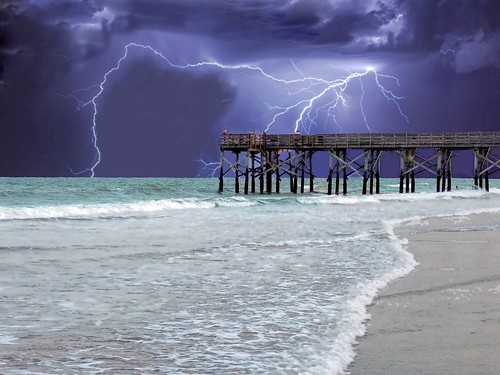
STANDING AT THE END, a photo by SOUTHERN HEART on Flickr.
I chose this picture because I thought it was simply beautiful. I had a terrible time trying to figure out how to share the picture. After trying probably fifteen times, I realized I had not linked my Flickr and Blogger accounts. It's really easy after that. I enjoyed looking through all the pictures in Flickr, it was very hard choosing just one.
http://www.flickr.com/photos/trypie/2766580132/
Subscribe to:
Posts (Atom)