I have to say my favorite exercises involved Flickr and the image generators. I'm not much of a photographer but I love looking at photography so Flickr is right up me alley. I liked using Flickr mash ups and image generators although at times it was frustrating trying to get everything to work properly. I do not have an artsy bone in my body so by using these I get to be creative. Honestly if I had not done 23 Things, I would still be in the dark about some of the technology tools available. I now know that there are a multitude of tools available at the click of a button. I think the program is really well done; the only thing I was not crazy about was the class sections blogs and then the activities were listed down the side of the page. If that is the way it has to be done, it would be nice if the activities list was first. As a teacher, I plan to use some of the tools I learned about. All students should have a blog. I liked the idea of collaboration using the wikis. It is a terrific way to get students thinking and brainstorming together. I will keep up with new developments in web 2.0 by reading the blogs in my Google Reader.

Thursday, April 19, 2012

Wednesday, April 18, 2012
Thing #23
http://findarticles.com/p/articles/mi_m0FWE/is_2_10/ai_n16133338/
This is a link to an article written by Stephen Abram, 43 Things I might want to do this year. The creator of Learning 2.0, Helene Blowers loosely based her program on Abram's article.
Now that I am familiar with Creative Commons, I will definitely make sure my students know the ins and outs of what they can use and cannot use. I want them to have the knowledge to properly give credit to the creator when credit is due.
This is a link to an article written by Stephen Abram, 43 Things I might want to do this year. The creator of Learning 2.0, Helene Blowers loosely based her program on Abram's article.
Now that I am familiar with Creative Commons, I will definitely make sure my students know the ins and outs of what they can use and cannot use. I want them to have the knowledge to properly give credit to the creator when credit is due.
Thing #22
Social Studies Online Games, Teacher Helper, and Teaching Strategies and Classroom Management are the names of my three binders. LiveBinders could be very useful in the classroom. Different binders could be created to help students with all sorts of learning and enrichment activities. Each subject could have a binder. The students could create a binder for for themselves or to share with fellow students. You could set up online scavenger hunts by putting the websites you want the students to look at in a binder and give them instructions on what to do.

Wednesday, April 11, 2012
Thing #21
Make your own slideshow at Animoto.
At first when I stared using Animoto, I found it very frustrating. I had a difficult time deciding which layout and song to use. I'm very indecisive and too many choices makes me crazy. But once I decided I enjoyed choosing which photos I wanted in my clip. I really enjoy looking at nature photos.
Thing #20
Thing #19
Visit TeacherPop
I am know officially a member of TeacherPop. I tried to upload a widget to it from Google and could not get it to work. The directions seemed easy enough but again it is probably the person following the directions who cannot get it right. So I uploaded some pictures instead. I looked through some of the social networks listed and I liked Flixster. I liked that it rated the movies and gives me a list of movies my friends are interested in. I also looked at GoodReads. I love that it will suggest books for you based on the genre you choose and the book titles previously read. I will definitely go back and explore more after I get through this semester.
Monday, March 26, 2012
Thing #18
Educators need to be familiar social networking because most of their students use it on an daily basis. Since I already use Facebook, I did not learn anything new about it. I do like that you can keep up with friends. I am not impressed with Twitter; I honestly have no need or desire to "follow" what a person thinks or feels like sharing everyday. Both Twitter and Facebook are useful tools for the classroom. Students can stay in touch with each other and help each other with homework and projects. Teachers could use Twitter to remind students of work or projects that need to be turned in. Teachers could also remind students about special occasions and days during school.
Sunday, March 25, 2012
Thing #17
After joining Delicious and searching Educational Technology, I found a site from Microsoft. It has free lessons, products, and services as well as technology tools for the classroom available for teachers to use. Some of the tags used for the bookmark include: lesson plans, resources, education, and Technology. Delicious would be a wonderful tool to use in the classroom. One of the other bookmarks was Ten Ways to use Skype in Your Classroom. Teachers could share lesson and unit plans, teachers could teach students on the other side of the world, students in different schools could work on projects together. There are too many possibilities for me to wrap my head around.
Friday, March 23, 2012
Thing #16
I chose iGoogle simply because I was already familiar with it. I like that it is very easy to use and there are lots of gadgets to choose from. Since I want to be a social studies teacher, I have This Day in History on my page. I also love reading quotes so I have Quotes from http://quotes4all.net/ on there. It is a great way to keep up with things but I do not use it as my home page; I am going to try it for awhile to see if I like it. Online calendars can be helpful keeping up with things in your life. When I tried to use one it took a long time to get the information into it. I am just going to continue using the pocket calendar I keep in my purse and the calendar I have on my refrigerator at home. The to-do list was more work than the online calendar. I am perfectly happy having Post-it notes covering the sides of my computer. It makes the computer very colorful. I would recommend iGoogle to others who want a good page that keeps up with the things that are important to you and what you find interesting.
Friday, March 16, 2012
Thing #15
I like the idea of being able to share information and ideas that anyone can add on to. People from all over the world can contribute. The only question I have is if people can go in and edit anytime they choose what's to keep someone from adding incorrect information? With that being said, wikis seem like a great way for students to brainstorm project ideas. Teachers could collaborate on unit and lesson plans and project ideas. I added thing #9 to the apsu23thingssandbox wiki. I like that you can share your ideas and others can add more to those ideas.
Thursday, March 15, 2012
Thing #14
I chose https://bubbl.us/ (mind map) and http://flowchart.com/ (flowchart). I had a much easier time using bubbl.us. It was very easy to put the information I wanted into each bubble. It is not one that you would use if you had to show it to a group or present in a project. It does not look professional. When I started using flowchart.com to make a chart, I had a difficult time getting it to work correctly. Again that is probably the operator's fault and has nothing to do the website. I tried to make a mind map and could not figure out how to get anything written into the chart. Then I started an organizational chart that was mush easier to use. The charts on this site look more professional; you could present these to others if need be.
Wednesday, March 14, 2012
Thing #13

I don't know if I like Zoho. I'm sure once I become familiar with it, it will be fine. I prefer the old way of creating documents, give me Microsoft Word any day. I do like that you can share your documents without having to send them in an email as an attachment. Groups projects would definitely be easier to manage with Zoho. Now I really do not like Zoho, I have spent the last twenty minutes trying to share this to my blog with no luck.
I enjoyed searching Google Docs. It was very user friendly. I created a drawing; it was really easy once I decided what I wanted to do. Google Docs is a great tool for students to use collaboratively. They can share and work on projects, like power points, documents, and spreadsheets, outside of class.
I liked using Google Docs better than Zoho. It was more user friendly in my opinion. Plus I could get the drawing on my blog, unlike downloading my document from Zoho. It is probably a user problem but it was very frustrating.
Monday, February 20, 2012
Thing #12
I created a home page for my iGoogle account. You can change the theme of your page to just about any picture you want to look at. The weather, date and time, cnn.com, and your gmail account are already linked to your page. My favorite part was adding the gadgets to my page. I picked This Day in History and Quotes from quotes4all.net. You can also add games, like bowling and Super Mario Brothers, virtual pets, dictionaries, and word of the day. There are too many gadgets to pick from. Students could each have their own page to keep up with current events. Teachers could email assignments to their students. Google Translate was the other Google tool I explored. It would come in handy when trying to talk with students who speak little English. I learned how to say My name is Shannon in French. Mon nom est Shannon
http://translate.google.com/
http://translate.google.com/
Sunday, February 19, 2012
Thing #11
I had a fairly easy time using Technorati. I like that it has different categories already available to choose from and you can also type in search words to find the blogs you are interested in. I like the idea of Topix.net. It provides links to the top stories around the Clarksville area or really any area you want to look at; it also provides national news. I chose History Tech and Teaching Blog Addict from Technorati. History Tech focuses on teaching social studies and history and integrating technology into the mix. Teaching Blog Addict is a community of parents, teachers, and mentors that provide fun, creative teaching tips and educational resources.
Wednesday, February 15, 2012
Thing #10
Having quick access to the blogs I have subscribed to is my favorite part about RSS. I also like that it lists other blogs that are similar to the ones I have subscribed to. RSS is a great tool to use in the classroom. Students can link their blogs to stay connected with each other. Teachers could connect with other teachers to share lesson plans and project ideas. I choose Confessions of a Pioneer Woman, Cool Cat Teacher Blog, Free Technology for Teachers, Blogging About The Web 2.0 Connected Classroom, and The Innovative Educator. I think all of these sites will provide me with tools and ideas to become a better teacher.
Saturday, February 11, 2012
Thing #9

http://www.imagechef.com/

ImageChef.com Poetry Blender
I had fun playing with the image generators. This would be a great tool to use in the classroom. A teacher might find bulletin board or decoration ideas for their classroom. You could send messages or words of encouragement to your students. Students could post images on their blogs. The only thing I was not happy with was some of the sites were inappropriate for children.
Sunday, February 5, 2012
Thing #8


.jpg)
I had fun exploring Flickr and Flickr mashups sites. Some were definitely easier than others to use. This would be a great site to use for students getting to know each other. Making puzzles out of pictures would be a great project for students. I think it is okay to share photos online. However I think it is smart to be cautious about where they are posted and be able to limit who has access to them.
Saturday, February 4, 2012
Thing #7
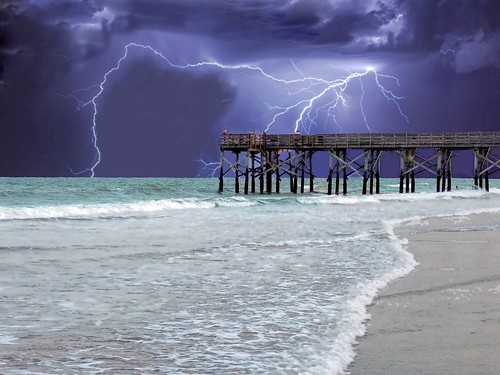
STANDING AT THE END, a photo by SOUTHERN HEART on Flickr.
I chose this picture because I thought it was simply beautiful. I had a terrible time trying to figure out how to share the picture. After trying probably fifteen times, I realized I had not linked my Flickr and Blogger accounts. It's really easy after that. I enjoyed looking through all the pictures in Flickr, it was very hard choosing just one.
http://www.flickr.com/photos/trypie/2766580132/
Tuesday, January 31, 2012
Thing #6
I picked www.pandora.com to explore. It's free. It is a music/radio site that allows you pick any artist, track, genre, or composer and make a playlist list. You decide whether or not you like a song then the service will play songs similar to the one you picked or move on to another song. You can create a playlist based on your musical preferences. It does have advertisements but they do not pop up like on other sites. This would be a great site to use during down time in the classroom. It would also work in a music class. The students could be exposed to all different kinds of genres of music.
Thing #5
School 2.0 means using all the technology available to education students. There are so many new and exciting ways to teach children using the web. Smart boards and clickers are great tools to use in the classroom. They are quick and easy to use. When I use in school we had overheads and projectors, it seemed to take forever to get set up for class. Student/Educational networking is a good way for students in different areas of the world to communicate with other. Teachers can use blogs to assign homework and post discussion questions. In the future, all students will carry laptops instead of books. Using paper and pencils will become a thing of the past. Teachers will be able to podcast lessons from home. Students may not even have to physically go to school, they will be able to stay at home and attend virtual school.
Monday, January 30, 2012
Thing #4
Blogging helps people get to know other people who share common interests and views. Commenting lets the blogger know that people are reading and appreciating their opinions. Criticizing kindly according to the Cool Cat Teacher is important. At some point you will disagree with what a blogger has written. It is important not to personally attack a person. The Blue Skunk Blog says by leaving a comment you are making a blogger's day. You can agree or disagree just make it heart-felt.
I selected Jessica Tucker's blog because I like her idea of using a weekly blog for her students to comment and discuss about current events. I think it is a great idea to teach them to be respectful of other people's opinions. I chose Lisa Weber's blog because I can relate to not having computers readily available in high school. She did not have any computers in her high school. Most of the teachers at my high school had a computer in the classroom but they were not for student use. I agreed with Alexis Harris on her comment about seeing problems as challenges and how frustrating problem can seem. That is why I chose her blog. I picked Elizabeth Thomas' blog because I like her idea about using a blog to remember previous year's success and unsuccessful projects. I picked Janice Stamper's blog because I absolutely love the picture she posted of where she grew up.
I commented on Cool Cat Teacher Blog by Vicki Davis. She published a post on 10 Ways to be a Terrible Teacher. I commented, "Thank you. As a college student preparing to be a teacher, I will definitely remember what kind of teacher not to be." I found what she had to say very informative. Some of her ways to be a terrible teacher include the teacher is always losing his/her temper or is predictably dramatic, the teacher is always on their cell phone, the teacher only teaches with one method, and my favorite the teacher who hates the students. Why be a teacher if you hate students?
I commented on a National Geographic Daily News article written by Christine Dell'Amore. The article is about a new species of crab that are purple and found in the Philippine island of Palawan. I commented that, "Nature is so beautiful. It definitely has a way of surprising us." It has always amazed me when new species are found. One would think that with all the technology we have we would have discovered everything by now.
I selected Jessica Tucker's blog because I like her idea of using a weekly blog for her students to comment and discuss about current events. I think it is a great idea to teach them to be respectful of other people's opinions. I chose Lisa Weber's blog because I can relate to not having computers readily available in high school. She did not have any computers in her high school. Most of the teachers at my high school had a computer in the classroom but they were not for student use. I agreed with Alexis Harris on her comment about seeing problems as challenges and how frustrating problem can seem. That is why I chose her blog. I picked Elizabeth Thomas' blog because I like her idea about using a blog to remember previous year's success and unsuccessful projects. I picked Janice Stamper's blog because I absolutely love the picture she posted of where she grew up.
I commented on Cool Cat Teacher Blog by Vicki Davis. She published a post on 10 Ways to be a Terrible Teacher. I commented, "Thank you. As a college student preparing to be a teacher, I will definitely remember what kind of teacher not to be." I found what she had to say very informative. Some of her ways to be a terrible teacher include the teacher is always losing his/her temper or is predictably dramatic, the teacher is always on their cell phone, the teacher only teaches with one method, and my favorite the teacher who hates the students. Why be a teacher if you hate students?
I commented on a National Geographic Daily News article written by Christine Dell'Amore. The article is about a new species of crab that are purple and found in the Philippine island of Palawan. I commented that, "Nature is so beautiful. It definitely has a way of surprising us." It has always amazed me when new species are found. One would think that with all the technology we have we would have discovered everything by now.
Tuesday, January 24, 2012
Thing #3
My blog will become very useful as my education progresses. I can use it to reflect on my experiences, classes, and projects. When I become a teacher I may use a blog in my classroom. I think it is a good way for students to showcase their writing. A blog would be a good tool for classroom discussions and assignments. I could also share my experiences in the classroom with other teachers. Lesson and unit plans could be shared with other teachers.
Thing #2
Setting up my blog was easy at times and frustrating at others. There were a few times I thought I was on the right track then have to start all over again. I am sure as I get better acquainted with how it works, I will find it much easier to navigate. My post name and blog title were not hard to pick. My blog title is the point of this whole thing and my post name is just me. My avatar does resemble me. I have brown hair and one of my favorite colors is purple. I wanted it to reflect somethings about me.
Thing #1
The easiest learning habit for me would probably be habit 2, accept responsibility for your own learning. I want to be here and I want to be getting an education. The first time I went to college, I did not take my classes very seriously. I really was not focused on my education, but now I am. It is important to me to get a good education. The hardest learning habit for me is habit 3, view problems as challenges. I tend to get anxious when problems get in the way. I need to remind myself that problems can be fixed and that they are nothing more than hurdles that I will learn from.
Becoming familiar with the Web tools will help me become a more effective teacher. Technology is such an important part of the classroom, as a teacher you have to have a good grasp on how to use it. I did not have the easiest time setting up my blog. I got frustrated on more than a few occasions.
Subscribe to:
Posts (Atom)